Onboarding/ Base Training
>>Return to Training Home<<
Playbooks Section
4. The "Branding Revival" Play
6. The "Realtor Referral" Play
7. The "LO Recruiting" Play
>>Return to Training Home<<
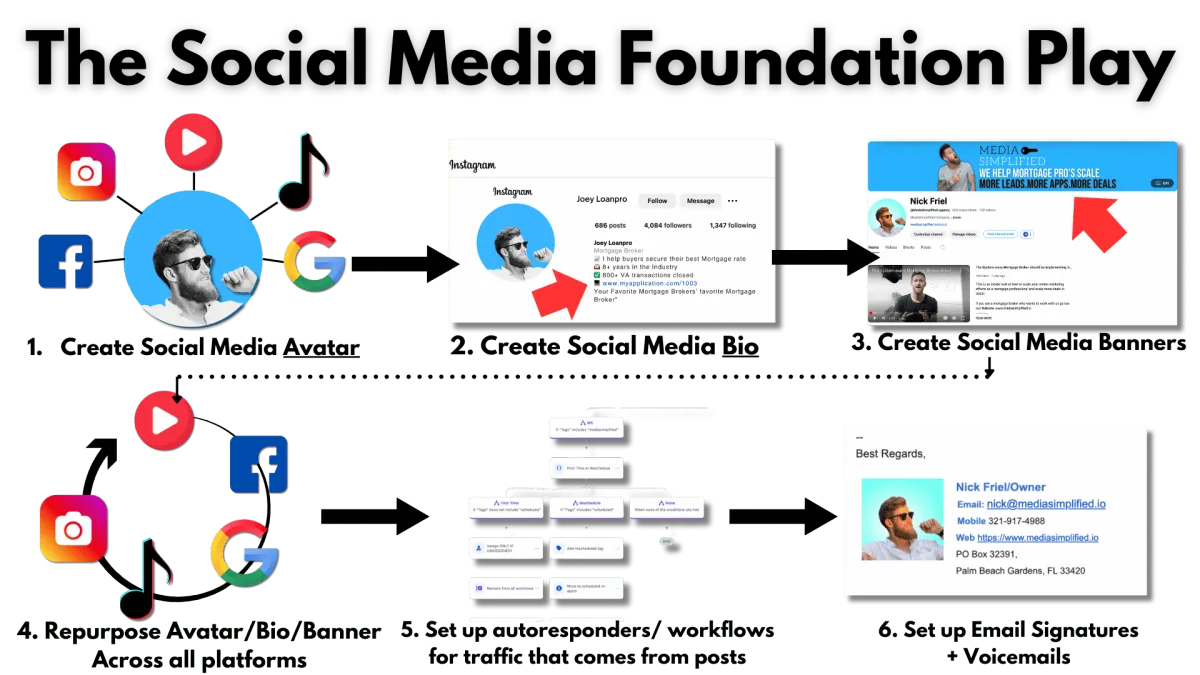
Module: Building Your Online Presence
Module Overview
- Set up Social Media Avatar - Update across all platforms (template provided)
- Create Bio for each page (include application link - template provided)
- Create Page Banner for each page (template provided)
- Set up autoresponders/workflows for traffic from posts
- Set up voicemails for account/workflows/reactivation
- Set up your email signature/User Avatar
How to Build an Irresistible Online Presence That Converts
Everyone knows they should have a better online presence but don't know where to start. This module focuses on:
- Establishing a strong online presence, including website, social media, press release articles, and more.
- Revamping, revitalizing, and reusing any previous assets, video content, or e-books you've created.
Media Simplified's mission is to help you see a return on every marketing dollar you've spent by utilizing all of your previous marketing/advertising efforts.
Step 1: Set Up Pages
- Ensure you have profiles on the core 6 platforms: Google My Business (GMB), YouTube, Facebook, Instagram, TikTok, and LinkedIn.
- Prioritize GMB and YouTube, as they significantly boost Google search visibility.
Step 2: Headshot/Social Media Avatar
- Use the same headshot/avatar across all platforms for brand continuity.
- Enhance your headshot with a colored background or make it grayscale with color highlights.
- Use removal.ai to remove the background from your headshot.
- Use the Canva Headshot Template to create a professional-looking avatar.
- Upload the updated headshot to all your social media platforms.

Step 3: Set Up Social Media Bio
- Keep it concise and include emojis to make it engaging.
- Include your role, what you do, experience, accolades, and a link to your application or site.
| Field | Example |
|---|---|
| Name | Joey Loanpro |
| Role | Mortgage Broker |
| What You Do | Help veterans get pre-approved using their VA benefits |
| Experience | 8+ years in the industry |
| Accolade | 800+ VA mortgages closed |
| Catchy Phrase | "Your Mortgage Broker's favorite Mortgage Broker" |

Step 4: Set Up Social Media Banners
Why Banners Matter
- Clearly state your expertise.
- Reflect your brand identity (colors, logo, tagline).
- Include a strong call-to-action, like "Apply Now" or "Message Me for a Free Consultation."

Step 6: Set Up Autoresponders
- Use workflows to create automated responses for messages received on social platforms.
- Ensure each autoresponder includes your application link and a personalized message.
Canva Templates
Linkedin: Canva Template
Youtube: Canva template
Facebook: Canva Template
Social Content: Canva Template
Content 2: Canva Template
@ Copyright 2020 - Digital Agency | All rights reserved